
Connect to Claude or ChatGPT to Build with Nova
ProNovos now integrates with Claude and ChatGPT. Contractors can connect their ProNovos account through a guided setup, ask Nova questions about their projects and financials, and build dashboards, trackers, reports, what-if models, and more in plain English. No technical background is needed, and Nova follows each user’s existing ProNovos permissions.
You can now connect Claude or ChatGPT to your ProNovos account and build your own trackers, models, reports, and dashboards just by describing what you want. No code, no IT ticket, no waiting on a report request.
If you've ever thought, "I just need one screen that shows X," this is for you.
What it is
Build with Nova connects the AI assistant you already use, Claude or ChatGPT, directly to your ProNovos data. Once connected, the AI can see the same project and financial data you can, and it knows ProNovos' design standards and publishing rules.
So when you ask for a dashboard, you don't get a generic mockup. You get something built on your live numbers, styled like the rest of ProNovos, ready to publish to your team.
And you don't have to build anything to get value. You can simply ask Nova questions from inside Claude or ChatGPT, like "Which projects are trending over budget this month?", without switching windows.
What you can build
Just describe it. A few examples of what you could type:
"Build me a dashboard showing every active project's billed-to-date versus budget, flagged red when we're over 90%."
"Make a weekly cash view of outstanding receivables by customer, sorted by how late they usually pay."
"Create a simple tracker my PMs can use to log change order requests, and show me a summary by project."
"Give me one page for the Monday ops meeting with retainage held, open pay apps, and anything past due."
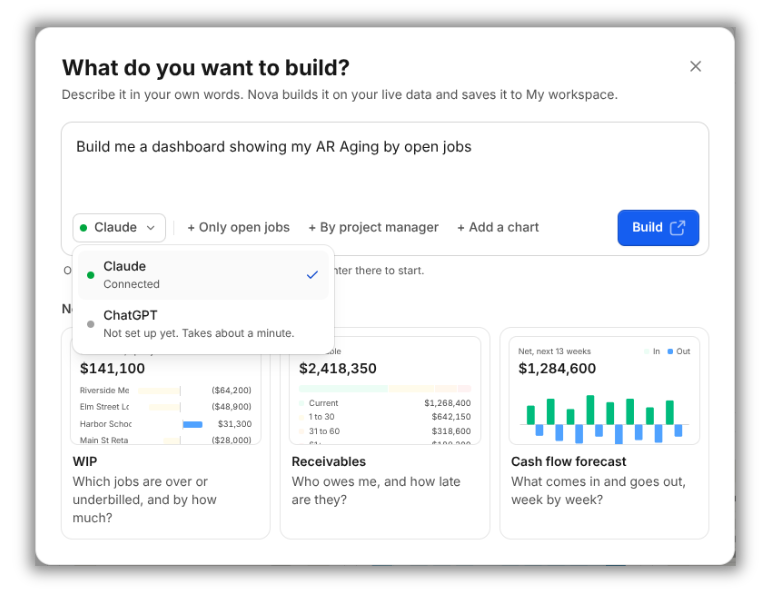
It goes beyond dashboards, too. Two new build types:
Model and what-if tools: "Show me what happens to our cash position if our two biggest customers pay 30 days late."
Guided lessons: "Build a step-by-step walkthrough that teaches new PMs how we review pay apps."
Build with Nova starts by planning each screen around the numbers it should show, so you see the plan before anything gets built. From there, keep refining in plain English: "add a filter by region," "make that a bar chart," "hide the closed jobs."
When it looks right, say "publish." Before anything goes live, Nova checks every tab and holds publishing if one is broken, so your team never opens a half-working build.
Everything you build with Nova is versioned, so if a change doesn't work out, you can roll back to the previous version in one step.
No technical background needed
You don't need to know SQL, write code, or understand how the data is structured. If you can explain what you want to a coworker, you can build it.
That's because ProNovos gives the AI a built-in rulebook: what data is available, how it's labeled, and how builds should look and behave. The AI handles the technical part. You stay focused on the question you're trying to answer.
This puts reporting in the hands of the people who actually use it: controllers, CFOs, project managers, and owners.
Setup takes about five minutes
Open Claude or ChatGPT. Use the desktop or web app you already have.
Add the ProNovos connector. A guided setup walks you through connecting ProNovos in your AI app's settings. No technical steps on your side.
Sign in with your ProNovos account. You'll be sent to the normal ProNovos login. Approve the connection, and you're done.
Start asking. Try "What ProNovos data can you see?" or jump straight to "Build me a dashboard of…"
That's it: no API keys, no installs, no IT setup.
Your data stays protected.
Opening your financial data to AI is a fair reason to be careful. Here's how Build with Nova keeps it safe:
Builds respect each viewer's permissions. A build runs as whoever is looking at it, so it can never show someone more than they could already see in ProNovos.
Admins control who sees what. Published builds plug into your existing permission groups. Sharing something you built beyond your own access level needs admin approval.
Nothing changes without a human. Your builds can suggest updates or draft emails, but a person reviews and approves before anything is saved or sent.
Every build gets a plain-English summary. When a build is published, ProNovos writes up what it does, what data it reads, and what it can propose to change, so admins know exactly what they're approving.
Builds are sealed off. Each build runs in its own sandbox for your company and can only talk to ProNovos.
FAQ
Does ProNovos work with ChatGPT?
Yes. You can connect ChatGPT to your ProNovos account to ask Nova questions and build whatever you can imagine (as long as you have the data in Nova) in plain English.
Does ProNovos work with Claude?
Yes. Claude connects to ProNovos the same way, through a guided setup inside the Claude app.
How do I connect Claude or ChatGPT to ProNovos?
Open Claude or ChatGPT, follow the guided ProNovos connector setup, and sign in with your ProNovos account. It takes about five minutes and needs no technical setup.
Do I need to know how to code?
No. You describe what you want in plain English, and the AI builds it using ProNovos' data and design standards.
What can I build?
Dashboards, trackers, what-if models, and guided lessons, all built on your live ProNovos project and financial data.
Is my data safe?
Yes. Build with Nova follow each viewer's existing ProNovos permissions, so no one sees more than they already could. Nothing is saved or sent without a person approving it, and admins control who can view each build.
Get started
If you already use Claude or ChatGPT, you're five minutes from building with Nova.
Already a user? Log in to your account and connect Claude or ChatGPT today.
New to ProNovos? Start your 7-day free trial and build your first dashboard this week.
Questions or need a hand getting set up? Email support@pronovos.com.